
Romantic Stickers WASticker.ly
Future-AppsCommunication
4.177.00 Reviews
- Version
- 53.0
- Installs
- 10.00M
- Age Rating
- Everyone
Screenshots
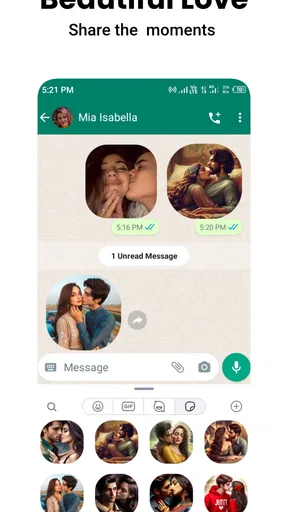
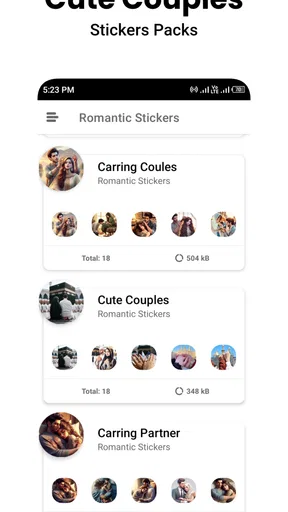
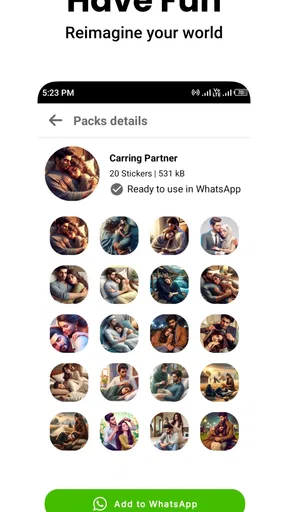
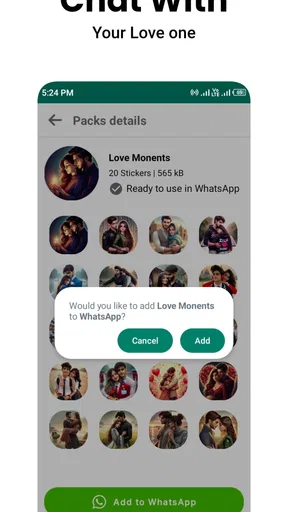
Our Review of Romantic Stickers WASticker.ly
 Analysis by Appyee
Romantic Stickers WASticker.ly is the kind of communication app I would install when ordinary emojis feel too plain for the message I want to send. It focuses on romantic sticker packs for moments that need a little more personality: saying good morning, replying to a sweet message, celebrating an anniversary, or sending an affectionate reaction without writing a long paragraph. The app is free, aimed at Everyone, and developed by Future-Apps.
My first impression is that its purpose is very clear. This is not a full messaging service, a photo editor, or a social network. It is a companion for chats, built around love-themed visual replies. That narrow focus is also its main strength: if you regularly use stickers in conversations, you can look for something warmer and more expressive than the standard sticker selection. If you rarely send stickers or prefer simple text, it may feel unnecessary.
How Romantic Stickers WASticker.ly fits into everyday chats
The app belongs to the Communication category, but it works alongside your usual messenger rather than replacing it. That distinction matters. You still need your preferred chat app for the conversation itself; this app is useful when you want an extra collection of romantic images available for sharing. I see it as a small creative add-on rather than an all-purpose communication tool.
The store summary presents it as offering unlimited romantic stickers, including love and kiss themes. In practical terms, that makes the app most appealing to people who communicate through visual reactions. A short sticker can soften an apology, add warmth to a routine “good night,” or make a congratulations message feel less formal. The best use is not sending a sticker in place of every sentence, but choosing one when the emotional tone matters.
One realistic example is a busy evening conversation. I might be travelling home, have only a few seconds to answer, and still want to respond affectionately. Instead of typing a rushed sentence, I can choose a romantic sticker that communicates enthusiasm or affection immediately. That workflow is especially handy in fast-moving chats, where a visual response can keep the conversation friendly without interrupting whatever else I am doing.
The app has reached over ten million installs and holds an average rating of 4.1 from around twenty-nine thousand ratings. Those figures suggest that the concept has found a substantial audience, while the rating also reminds me to keep expectations sensible: it is popular, but it will not be equally useful for every communication style.
Finding the right sticker without slowing down the conversation
When a sticker app has one clear theme, browsing can be easier than searching through a general collection filled with unrelated characters, jokes, memes, and seasonal material. Here, the useful mental shortcut is to decide what mood I want first: affectionate, playful, apologetic, celebratory, or simply cute. That makes selection faster than opening the app with no idea what kind of response I need.
A practical habit is to look through the available romantic choices before starting an important conversation. If I am preparing a birthday message, a reconciliation note, or a special-day greeting, choosing a suitable sticker in advance avoids the awkward pause of searching while the other person is waiting. This is a small workflow improvement, but it makes the app feel more useful than a tool I open only at random.
I would also avoid treating every sticker as interchangeable. A kiss-themed image may work well in a private conversation with a partner but feel inappropriate in a family group or a mixed social chat. The app’s focused theme means the emotional tone can be strong, so I recommend checking the recipient and the context before sending. That is not a technical limitation, but it is an important part of using a romantic sticker collection well.
What to expect from speed and resource use
Because Romantic Stickers WASticker.ly is a focused sticker utility rather than a large messaging platform, my expectation is that common actions should feel straightforward: open the app, browse a romantic collection, and choose something to share. I would not expect it to perform like a demanding game or a video editor. Its job is relatively narrow, so the experience is best judged by how quickly it gets me from an idea to a usable sticker.
At the same time, sticker browsing can become less convenient when a collection is visually busy or when I am trying to compare many similar options. The app’s value depends on reducing that decision time, not merely presenting a large quantity of images. If I have to scroll through several near-identical choices for every reply, the unlimited nature of the collection becomes less impressive. The most efficient approach is to identify a few dependable styles and use them repeatedly when they fit.
I would also keep realistic expectations about resource demands. No app should be judged only by its small purpose; browsing visual content can still involve loading and storage considerations, especially on a device with limited free space. Since the available release is version 53.0, I would keep the app updated through the normal store process when updates are offered, particularly if sharing behavior or compatibility changes over time.
One useful tip is to avoid opening the app in the middle of a sensitive conversation unless I already know what I want. Romantic stickers are most effective when they support a message, not when they replace thought. If the other person is asking a serious question, a sticker alone may seem dismissive. I would write the important part first and use a sticker as an emotional accent afterward.
How it handles heavier everyday use
For occasional use, this type of app should be easy to understand. The more interesting test is what happens when I use it repeatedly throughout the day: replying to several chats, comparing different romantic moods, and returning to the app whenever a conversation calls for something more expressive. In that situation, convenience depends less on novelty and more on whether the selection process remains manageable.
My advice is to build a personal routine around a few situations rather than browsing endlessly. I might use one style for affectionate greetings, another for playful replies, and a third for celebrations. This keeps the app from becoming a time sink. It also makes the stickers feel more personal because I am choosing them intentionally instead of sending the first image that appears.
Heavy use can expose the difference between a dedicated sticker app and the built-in sticker options in a messenger. The built-in alternatives are usually faster when I already know what I want and do not want to leave the chat. Romantic Stickers WASticker.ly becomes more worthwhile when the default options feel repetitive or do not match the tone I want. In other words, its advantage is variety within a specific emotional theme, while the usual alternative wins on immediate convenience.
Another trade-off appears in group chats. A romantic sticker can make a private exchange feel lively, but repeated affectionate images may be distracting in a busy group. I would use the app more heavily for one-to-one chats and selectively in groups. That simple distinction helps preserve the charm of the stickers instead of turning every conversation into the same visual pattern.
Reliability, recovery, and the moments that matter
For a communication companion, reliability is not only about whether the app opens. It is also about recovering smoothly when I switch between the sticker app and my messenger, return after an interruption, or need to repeat an action. A sticker tool is most useful when it stays out of the way. If I have to restart a search every time I move between apps, the emotional value of the sticker is overshadowed by friction.
I would approach recovery in a simple way: if a selection does not go through as expected, return to the conversation and check whether the sticker actually appeared before trying again. Sending duplicates is easy when I assume the first attempt failed. This is a small but realistic habit for any app that works alongside another communication service.
It is also wise to keep a text alternative ready. A sticker is a supplement, not a dependable replacement for an important message. If the conversation involves plans, an apology, a clarification, or anything that could be misunderstood, I would type the essential information and add the visual response afterward. That approach protects the meaning of the conversation even if the sticker workflow becomes inconvenient.
The app has been available since May 7, 2023, and its current version is 53.0. I see that ongoing version history as a reason to pay attention to compatibility rather than assuming every device will behave identically. The app may be perfectly comfortable on one phone and less convenient on another because of differences in screen size, available storage, or how the accompanying messenger handles stickers.
Compatibility and device constraints
Romantic Stickers WASticker.ly supports devices running Android 8.0 or later. That gives it a reasonably broad range of compatibility, but anyone using an older Android phone should check the operating-system requirement before spending time looking for a suitable sticker collection. For supported devices, the main practical question is not raw power; it is whether the phone has enough room and whether the user is comfortable moving between apps while chatting.
On a smaller screen, browsing visual choices can require more scrolling, and similar stickers may be harder to distinguish quickly. On an older or heavily loaded phone, I would be more patient when switching between the sticker app and a messenger. I would not install it expecting a major performance burden, but I also would not assume that every device will feel equally quick simply because the app has a focused purpose.
Battery expectations should remain modest rather than absolute. A short sticker selection session is a very different workload from leaving any visual-content app open for long periods while repeatedly browsing. If I am trying to conserve battery, I would choose a sticker before opening a long conversation and avoid unnecessary browsing. That is a better habit than keeping the app open while deciding among many nearly identical images.
The age rating of Everyone makes the app broadly approachable, but the romantic theme still calls for judgment. “Everyone” describes general suitability; it does not mean every sticker belongs in every conversation. I would consider the recipient, the relationship, and the setting before sharing anything strongly affectionate. That is especially important when a phone is shared or when messages appear in a family or work-related group.
Who will enjoy it, and who should skip it
I think this app is a good match for people who already use stickers often and want a collection centered on love, affection, kisses, and romantic reactions. It is also useful for anyone who finds plain emojis too limited but does not want to create custom artwork. Couples, close friends with playful communication styles, and people who enjoy expressive greetings are the most obvious audience.
I would recommend skipping it if your conversations are mostly professional, text-based, or focused on practical information. A general sticker collection may be more useful if you want humor, animals, memes, celebrations, and reactions all in one place. Likewise, if you dislike leaving the chat app to find a response, the built-in sticker picker is probably the better option even if its romantic selection is smaller.
There is also a middle ground. You do not need to become a frequent sticker sender to benefit from it. Installing it for a specific occasion can make sense, such as preparing a thoughtful greeting or adding a warmer touch to a long-distance relationship. The important question is whether the app solves a real communication need for you, rather than whether it offers more stickers than you could possibly use.
My performance verdict after weighing convenience against variety
My overall view is that Romantic Stickers WASticker.ly succeeds because it stays focused. It gives romantic communication its own space instead of burying affectionate options inside a huge, mixed collection. The free price removes the main barrier to trying it, and the Everyone rating makes it accessible to a broad audience. Future-Apps has built something easy to understand: open it when a chat needs a more personal visual response.
The compromise is that focused variety is not the same as universal usefulness. If I need a fast, neutral reaction, the messenger’s built-in emojis may be better. If I want comedy or a broad range of subjects, a general sticker app may offer more flexibility. This app is strongest when the emotional subject is already clear and I want a romantic image that matches it.
In terms of perceived speed and stability, I would judge it by the simplicity of its role rather than expect advanced tools. Keep the browsing focused, use text for important details, and treat the stickers as accents. Those habits reduce the main sources of friction: searching too long, choosing an unsuitable tone, or relying on a visual response where clear wording is needed.
My recommendation is straightforward: install it if romantic stickers are a natural part of your chats, but skip it if you rarely communicate visually. With an average rating of 4.1 and more than ten million installs, it is clearly useful to many people, yet its value remains personal and situational. For me, it works best as a lightweight way to make ordinary messages feel warmer without turning every conversation into a performance.
Ultimately, Romantic Stickers WASticker.ly is not trying to replace messaging; it is there to give affectionate conversations more texture. Used selectively, it can make a quick reply feel intentional, help a greeting stand out, and add emotion when words alone seem flat. Used constantly, it may become repetitive. That balance is the key to getting the most from it.
Verdict
Strengths of Romantic Stickers WASticker.ly
- Large collection of romantic stickers for different moods and occasions.
- Quickly adds sticker packs to WhatsApp with minimal setup.
- Includes cute, funny, and affectionate designs for varied conversations.
- Lightweight app that is generally easy to browse on mobile devices.
- Useful for expressing emotions when text messages feel too plain.
Limitations of Romantic Stickers WASticker.ly
- Some packs may contain repetitive designs or limited sticker variety.
- Frequent ads can interrupt browsing and pack selection.
- Sticker quality may vary between user-created collections.
- Requires WhatsApp to use the downloaded sticker packs.
- Some packs may disappear or stop receiving updates over time.
Similar Picks in This Category
View All
Google Messages
Google LLC4.6

Gmail
Google LLC4.1

Google Meet
Google LLC4.4

Google Chrome
Google LLC4.1

WhatsApp Messenger
WhatsApp LLC4.6

Carrier Services
Google LLC4.2
Frequently Asked Questions
What is Romantic Stickers WASticker.ly?
Romantic Stickers WASticker.ly is a sticker collection designed for WhatsApp users who want to express affection, love, and romantic feelings in conversations. It typically includes stickers featuring hearts, kisses, couples, sweet messages, and other relationship-themed designs. After installing the app, you can browse available packs and add compatible collections to WhatsApp for use in individual chats or groups.
How do I add Romantic Stickers to WhatsApp?
Open Romantic Stickers WASticker.ly and choose the sticker pack you want to use. Tap the option to add or export the pack to WhatsApp, then confirm the action when prompted. Once the process is completed, open WhatsApp and access the sticker section from the emoji menu. The new romantic stickers should appear among your available packs, ready to send in chats.
Is Romantic Stickers WASticker.ly free to download and use?
The application can generally be downloaded without an upfront charge, although availability and pricing may depend on the Android or iOS store listing in your region. Some versions may include advertisements, optional purchases, or additional sticker collections. Before installing, check the store page carefully for current pricing, in-app purchase information, and any conditions related to premium content.
Does Romantic Stickers WASticker.ly work on every phone and WhatsApp version?
Compatibility depends on your device operating system, the app version, and the WhatsApp version installed on your phone. Most recent Android devices should support sticker applications of this type, while iPhone users may have different installation or sharing procedures. If stickers do not appear, update WhatsApp, restart the app, and confirm that the sticker pack was successfully added.
Are there privacy or safety concerns when using Romantic Stickers WASticker.ly?
As with any third-party sticker application, review the permissions requested before completing installation. A simple sticker app should not normally require access unrelated to its main function, so permissions involving contacts, messages, or extensive device data deserve attention. Download the application from a trusted store, read recent user reviews, and avoid modified versions from unofficial websites to reduce security risks.
